ServiceTitan barcode scanning and equipment capture

Cleaner field data before the job closes.

Scannur gives home-service teams a practical mobile workflow for scanning materials, adding items to ServiceTitan jobs, and capturing equipment nameplate data in the field.

Download on the App Store Get it on Google Play
ST job and PO workflows
AI equipment text extraction
CSV exports for cleanup work

Built around ServiceTitan operations

Scan the item once. Keep the job record usable.

Technicians can scan inventory in the field and connect materials or equipment back to ServiceTitan jobs and purchase orders. Managers get fewer mystery parts, fewer manual corrections, and better job-cost visibility.

01

Inventory used on jobs

Capture barcode-backed item usage while the work is still fresh.

02

Job and PO context

Route scanned items into the operational records your team already works from.

03

Multi-instance support

Support enterprise teams with more than one ServiceTitan tenant.

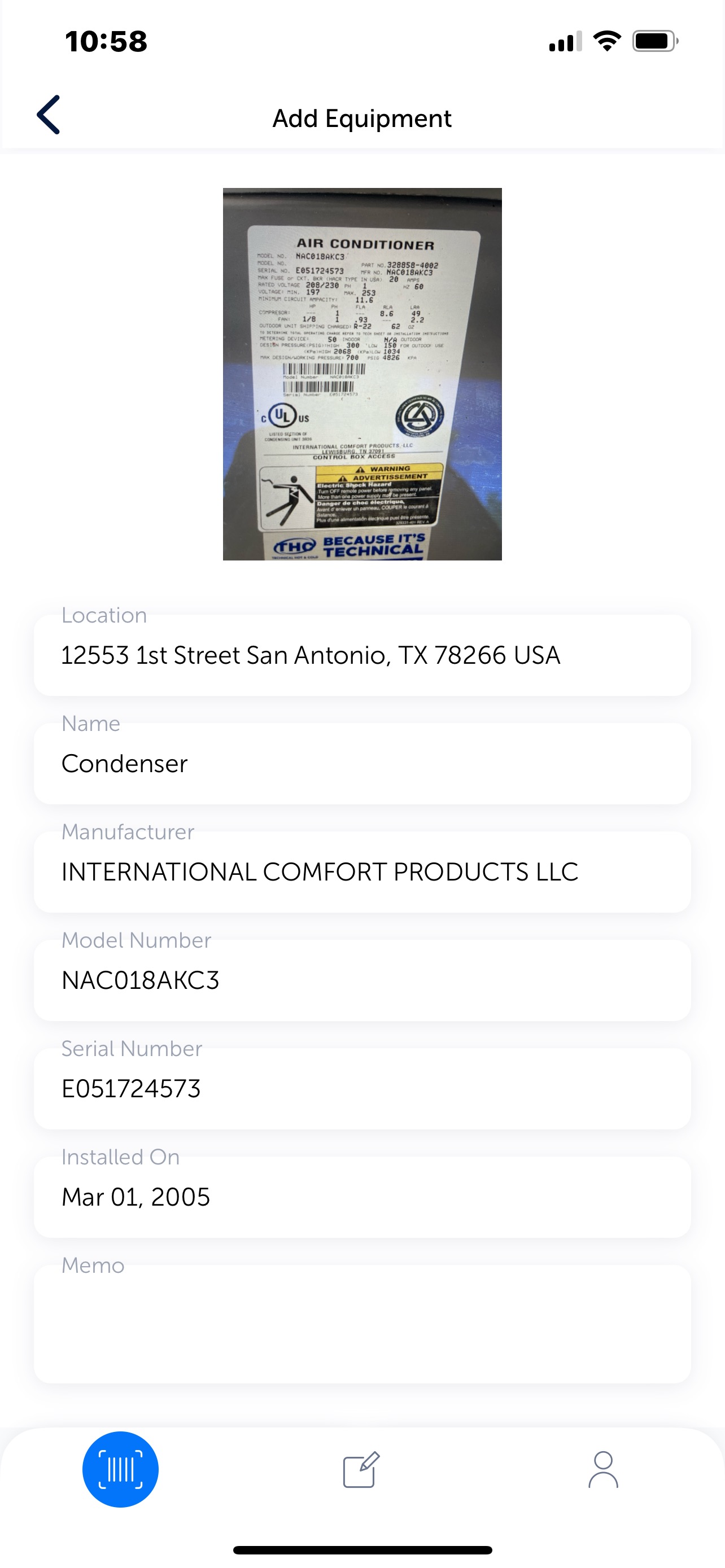
Scannur equipment capture screen showing extracted HVAC model and serial data

Equipment data extraction

Nameplates become structured records.

Scannur can turn HVAC and water-heater nameplate photos into searchable equipment data: manufacturer, model, serial, location, install date, and notes your office can verify before updating the system of record.

  • Capture existing equipment during service calls
  • Review records before syncing or saving
  • Support backfill projects from stored CRM or ServiceTitan images

Field to office workflow

A practical loop for cleaner data.

Scan

Technician captures the item or equipment plate.

Barcode scanning and camera capture keep the work mobile-first.

Match

Scannur connects the record to the right job context.

Use job, PO, pricebook, and equipment details where they matter.

Review

Office teams verify before the data becomes permanent.

Catch misses before they become reporting or job-costing problems.

Export

Move cleanup data into the next system or report.

Use exports for audits, backfills, or process improvement work.

Training and implementation

Keep the existing help surface while the new site takes shape.

We can preserve the docs, training videos, privacy pages, and EULA links during the rebuild so customer support does not lose continuity.

Pricing

Start with the workflow that needs cleanup first.

Mobile scanning

Barcode scanning, custom fields, lists, and exports for teams that need better item capture.

Talk pricing

Backfill and data projects

Equipment extraction, cleanup files, and custom API/data work around existing records.

Scope a project

Ready for a cleaner field workflow?

Let’s map Scannur to the jobs, equipment, and reporting gaps that are costing your team time.